


 All Programs

Hands-on program · 8 weeks · no coding
Claude is not a chatbot for fun, it is a second colleague — and we will teach you to use it
A program for people who work with text, documents, spreadsheets and other people. We do not cover «AI in general» — we take one tool and go all the way down.
a week — the average saving participants report
working scenarios you leave with
programs about Claude aimed at non-developers
lines of code you write on this program
The first two figures come from a participant survey; the third from public course catalogues as of August 2026.
You tried it, got fluff back and gave up. That was not your fault
01«Write some copy about our product»
No context: who reads it, why, how long it should be, what should happen after they read it.
How it should beAn email to a retail buyer who has never heard of us. 1,200 characters, no adjectives. The goal: agreement to a 15-minute call.
02«Make it nice»
No definition of done — there is nothing to judge the result against, so the result is nothing.
How it should beDone when: three paragraphs, the first sentence is a benefit to the client, and the word «innovative» appears nowhere.
03«Analyze this table»
It does not say what to look for or in what form to return it. You get a retelling of the table, not a conclusion.
How it should beFind the items whose margin dropped by more than 10% compared with May. Return a table: item, before, after, likely reason.
04«You are a world-class expert»
A role without a task does nothing. That is a ritual, not a brief.
How it should beRead this contract as the client's lawyer would. List the risks for us, clause by clause.
A prompt is a brief. This program is about how to write one.
Whose specific problem this program solves
Department head
«Every week I merge three departments' reports into one summary — that is half a day»
On the program we solve: a scenario for merging reports, plus agendas and meeting summaries.

Sales manager
«Every proposal takes an hour and a half, and the client reads it in two minutes»
On the program we solve: a proposal generator for your segment, and email threads analysed for objections.

Accountant
«Explanatory notes and reconciliations eat the time I need for month-end close»
On the program we solve: working through exports, checking documents against a checklist, drafting explanatory notes.

Marketer
«I put the content plan together in a panic the night before»
On the program we solve: a month's plan in 40 minutes, and headline variants ready to test.

Lawyer
«I skim contractors' contracts and worry I am missing something»
On the program we solve: a contract checked against a risk checklist, plus a draft of the amendments.

HR
«Going through thirty applications is an evening I do not have»
On the program we solve: a summary of applications, job posts and interview scripts.

Anthropic has a free academy. We will tell you plainly when it is the better fit
Go to Anthropic Academy if
- You read English comfortably
- You are a developer and you need the API, MCP and agents
- You are happy to work it out alone, without feedback
- You want an official certificate from Anthropic
Come to us if
- You want the program in a language other than English
- You are not a developer: you need emails, contracts and reports, not code
- You want a real person to review your work
- You need working access and a clear line on what you can and cannot hand to AI under privacy law
We are not competing with Anthropic — we translate their tool into the language of your job. We link to their academy inside the program.
How this differs from what is already out there
| Our program | General «AI courses» | Courses about Claude Code | Anthropic's free academy | |
|---|---|---|---|---|
| What they teach | Claude as a working tool | A tour of a dozen services that is really about ChatGPT | Coding with AI | API, MCP and agents for developers |
| Do you need code | Not needed | Not needed | Needed | Needed |
| Language | Russian | Russian | Russian | English |
| Reviewed by a human | A mentor reviews your work | Depends on the plan | Depends on the plan | No, on my own |
The program: eight modules, twelve practice assignments
Every module ends not with a quiz but with a working artefact that stays with you.
How it differs from a search engine and from ChatGPT. Context and its limits. Why it holds a long document but not yesterday's conversation.
The five parts of a working request: context, role, task, output format, definition of done. Iterating instead of rewriting from scratch. How to make it ask you clarifying questions.
Uploading files, working with long documents, pulling out the substance, the numbers and the risks. Checking a document against a checklist. Turning an hour-long meeting into seven bullet points.
Emails, proposals, internal procedures, posts, replies to complaints. How to set your own voice and avoid generic internet boilerplate.
Working through exports, spotting patterns, formulas, and reading numbers back in plain language. What Claude calculates reliably and what you should always double-check.
Standing instructions, your company's materials uploaded once, repeatable scenarios. How to stop explaining the context from scratch every time.
Connecting email, spreadsheets and messaging. What MCP and agents are in plain language — and where the line is, beyond which you need a developer.
Where the model makes things up and how to catch it in a minute. What you must not upload: personal data, trade secrets, other people's documents. Privacy rules in plain language, including PIPEDA and GDPR basics. How to agree on ground rules inside your team.
What you will be able to do in eight weeks
Frame a task so you get the result on the first try, not the fifth
Work with documents: contracts, reports, long PDFs, meeting minutes
Work through tables and exports, and pull out the meaning and the numbers
Write emails, proposals and procedures in your own voice, not in generic internet English
Build an assistant for your own role, with your company's knowledge base
Set up simple automation without a single line of code
Tell a reliable answer from an invented one and know what to always double-check
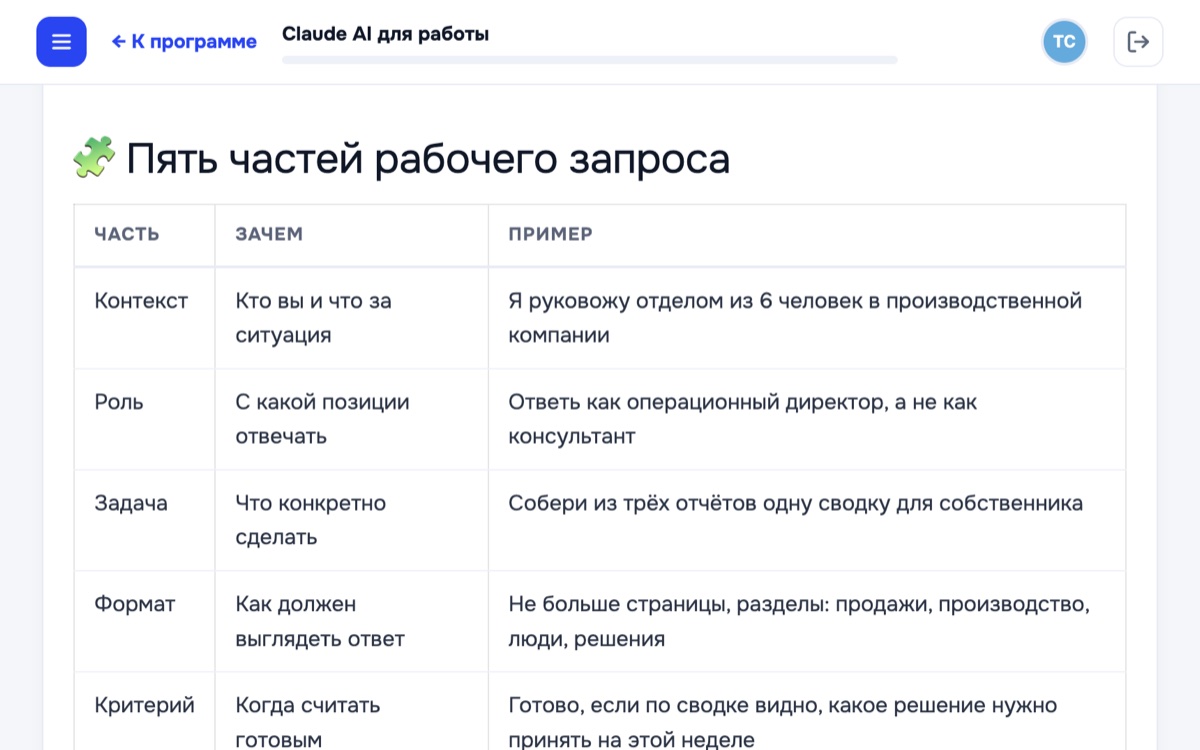
A fragment of lesson 2, “The prompt as a brief”. Screenshot from the Russian-language platform.
What that changes at work
- Frees up 5–9 hours a week, depending on the role
- Recurring documents follow a template instead of being written from scratch
- No waiting on a copywriter, an analyst or a lawyer just to get a draft
- You can take on more work without extending your day
- It is clear what you can hand to AI and what you must never hand over
- You explain it to your team and roll it out in your department
How the program works
Your own pace, with real feedback
Lessons open week by week and you watch them whenever it suits you. Practice is submitted as text or a file — the mentor replies on the substance, not with «well done».
The tasks are yours, not textbook ones
We start from your own report, contract or email thread. By the end you have a set of working scenarios, not a folder of notes.
We sort out access in the first session
We show how to get set up with Claude wherever you are and explain how the plans differ. The subscription to the tool is charged separately and is not part of the program price.
You will not be left alone with the material
Your mentor is a practitioner who works with Claude every day, not a marker following a rubric. Replies within one business day.
- You can ask anything about the program and about your own tasks: why a prompt did not work, how to rephrase it, and what is worth handing to AI in the first place.
- If you get stuck on the practice, you send your prompt and the result; the mentor shows exactly where it went off and sends back a reworked version.
- The group chat stays open after the program — people keep posting their finds and breakdowns there.
OnStudy
Certificate
of completion
Claude AI at Work · 8 weeks
You finish with a certificate for your records
The certificate confirms that you completed the eight-week program and presented a final project — a working scenario built for your own role. It is useful if you report your training to an employer or ask for the cost to be reimbursed. It is a school certificate from a private company, not a government qualification.
- Issued after you present the final project — included in the «With a mentor» plan
- Suitable for reporting your training to an employer
- Issued by OS Strategy Ltd. as a private school certificate
Pricing
Most «AI courses» spend months skimming a dozen tools at once. We charge for one tool taken all the way down, in eight weeks.
Self-paced
or $79 × 6 months
- All 8 modules and the recordings
- 12 practice assignments with model answers
- A library of prompts and templates
- Access to the materials for one year
With a mentor
Recommendedor $138 × 6 months
- Everything in the «Self-paced» plan
- All 12 practice assignments reviewed, on your own tasks
- Your prompts reviewed in the group chat
- Two live online review sessions
- Certificate of completion
Team
price on request, with closing documents
- A program shaped around your department's tasks
- A company-wide set of rules for working with AI
- A progress report for the manager
- Contract, invoice, closing documents
Questions people ask before paying
Claude is available in most countries, and we walk through access and setup in the first session. If your company policy restricts external AI services, tell us before you pay: we will say honestly whether the program makes sense in your case.
You can complete the program on the free plan, though with volume limits. From the documents module onward a paid plan is more comfortable — we show how to set it up and explain exactly what it gives you. The subscription to the tool is not included in the program price.
The program is written for exactly this case: not a single line of code, nothing to configure in a terminal. All you need is a computer, a browser and your own work tasks.
About three hours: one for the lessons, two for the practice. The practice runs on your own real task, so most of the time it replaces your usual work rather than adding to it.
Yes. Within 14 days of the start we refund the full amount with no questions asked; after that, pro rata for what is left. The procedure is set out in our Refund Policy.
Join the cohort
Leave your details — a mentor will get in touch, ask about your tasks and suggest which plan makes sense. If the program is not right for you, we will say so.
Full refund within 14 days of the start. Company payment — contract, invoice and closing documents. The next cohort starts on 7 September; the mentored group is capped at 20 people.
Services are provided by OS Strategy Ltd., Business inc. no. 733205900, Registry ID 2024240059, 27 Sunrise Crescent SE, Calgary, Alberta T2X 3A1, Canada. Phone +1 408 210 5489, email info@onstudy.org. Payment for the program constitutes acceptance of the Terms of Service.
Terms of ServicePrivacy PolicyRefund PolicyAll legal documents
 WhatsApp
 Telegram
 I have a question

